Introduction
Agirunner is an open-source system for running real work through AI agents with an operator-grade agent orchestration plane, an isolated execution layer, and rich operator visibility.
It is API-first by design, with a dashboard for teams that need to launch, observe, steer, and review live workflows. Its orchestration layer is built to keep those workflows moving toward the best available conclusion instead of stopping at a single model response or forcing humans to stitch process around raw LLM calls.
Shared community playbooks, specialists, and skills live in agirunner-playbooks and can be imported into tenant-local copies from the dashboard.
That distinction matters. It is easy to get a model to answer a prompt. It is much harder to run useful work repeatedly, route it through a durable process, keep execution isolated, and still give humans a clean place to understand what happened, what is blocked, and what should happen next.
Why Teams Reach For Agirunner
Section titled “Why Teams Reach For Agirunner”Teams usually reach for Agirunner when they want one or more of these at the same time:
- agent workflows that can be launched repeatedly instead of rebuilt from scratch each time
- a dashboard where operators can actually see and steer live work
- an API that exposes the same control plane to other systems
- isolated runtime execution with tools, workspaces, logs, and artifacts built in
- a reusable catalog of playbooks, specialists, and skills they can import and adapt
Why Agirunner Exists
Section titled “Why Agirunner Exists”Most agent setups start strong and then fail at the same edges:
- workflow logic lives only in prompt text, so the process is hard to inspect or repeat
- tool access is powerful but poorly isolated, so execution becomes risky fast
- “success” is inferred from model prose instead of from real outputs and artifacts
- operators have no good place to launch work, intervene, or review what happened
Agirunner exists to solve those problems with explicit boundaries and a clear product surface:
- the platform owns workflow state, routing, approvals, roles, tool policy, the dashboard, and the public API
- the runtime owns isolated execution, tool dispatch, result capture, and execution reporting
- operators use the dashboard to launch and supervise work
- integrators use the API to drive the same control plane programmatically
What The Product Looks Like
Section titled “What The Product Looks Like”At a high level:
- you define, choose, or import a playbook from the community catalog
- you launch a workflow through the dashboard or API
- the platform creates and activates work
- the runtime claims tasks and executes them in isolated environments
- results, artifacts, logs, and operator actions flow back through the platform
That means Agirunner is not just “an agent with tool use.” It is a system for authoring process, launching work, supervising progress, and capturing evidence in a way that remains understandable later.
Who It Is For
Section titled “Who It Is For”Agirunner is a good fit when you need one or more of these:
- a dashboard for supervising agent workflows instead of only prompting a model directly
- an API for integrating agent work into another system
- a shared community catalog of reusable playbooks, specialists, and skills
- explicit separation between workflow meaning and execution mechanics
- containerized task execution with workspace and tool boundaries
- artifacts, logs, approvals, and operator actions as first-class product features
Architecture
Section titled “Architecture”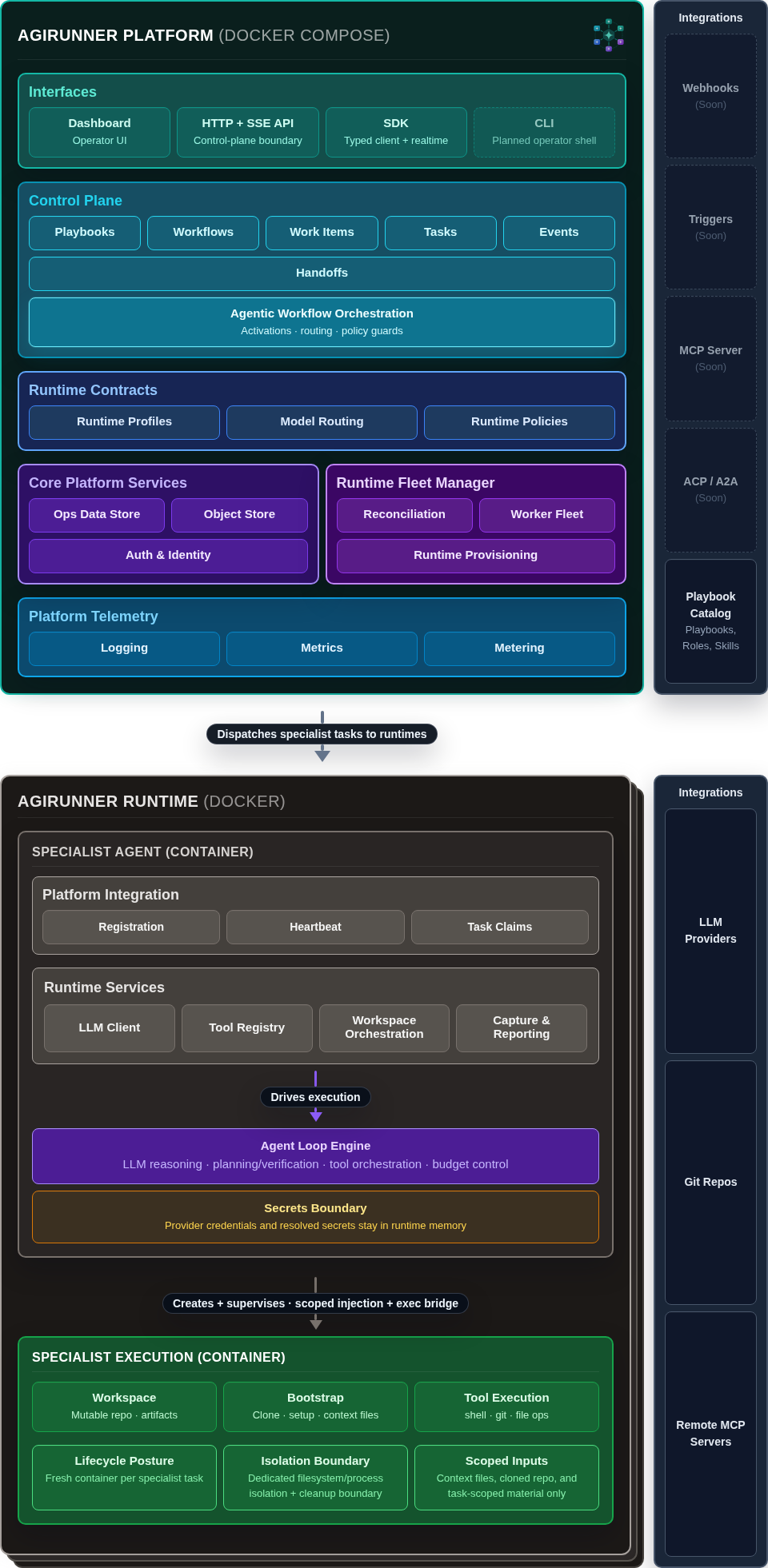
The main mental model to keep is that Agirunner has a control plane and an execution plane, and the system is easier to operate because those responsibilities are not blurred together. Open the Architecture Diagram and the Architecture Overview for the detailed breakdown.
Choose Your Path
Section titled “Choose Your Path”- Installation if you want a local stack
- Quick Start if you want to launch real work quickly
- Dashboard Path if you are starting as an operator
- API Path if you are integrating programmatically